Every flagship launch arrives with the same familiar checklist: a faster chip, smarter AI, and a camera system that promises to turn ordinary users into professionals.
Samsung delivers all of that with the Galaxy S26 Ultra.
But after the first-look excitement settles, the most consequential upgrade this year is not on the back of the phone. It is on the front.
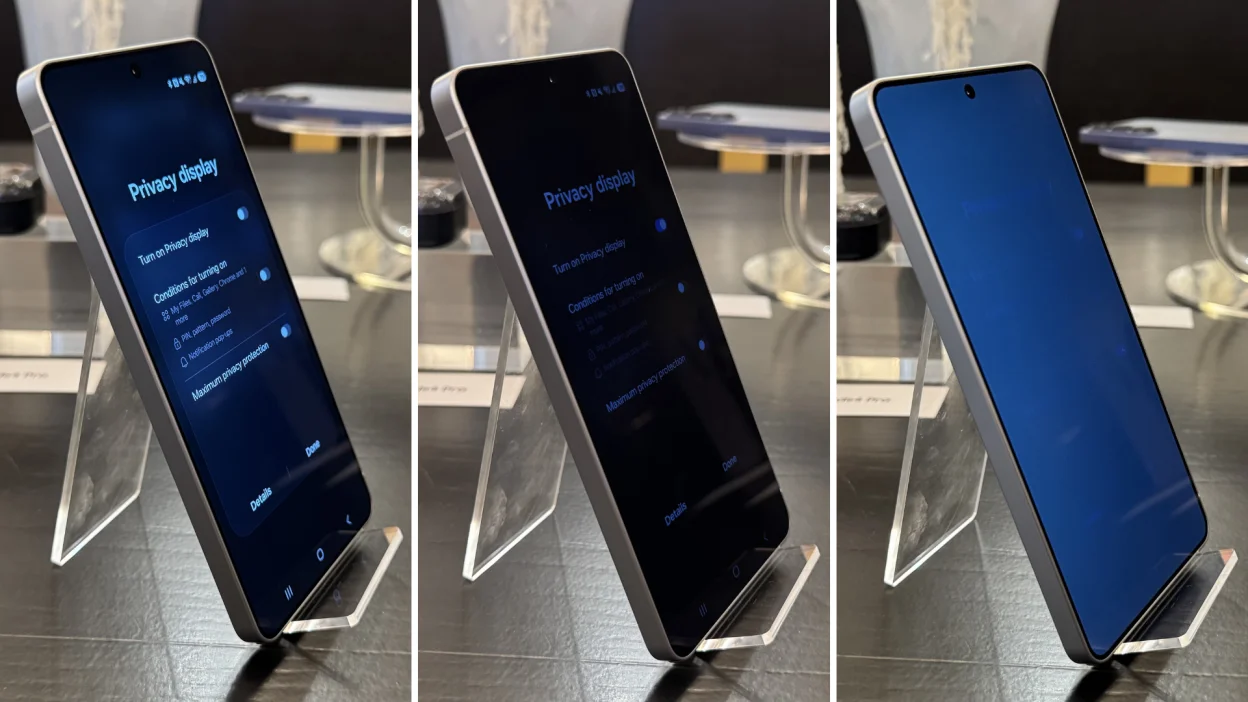
The Galaxy S26 Ultra is the first Galaxy device with a built-in Privacy Display - a hardware feature designed to limit what people at your sides can see while keeping the screen legible for the person holding it.
In consumer marketing language, that sounds like a clever convenience.
In business language, it is more important than that. It changes where, when, and how a professional can work without hesitation.
For consultants, founders, account managers, and operators, the smartphone is no longer a secondary screen.
It is the device that opens the CRM between meetings, approves invoices in an airport queue, checks campaign numbers in a taxi, and replies to confidential client threads on a crowded train.
Cameras still matter, and performance still matters, but the screen is the real revolution this year because Samsung has finally treated visual privacy as a first-class hardware feature rather than an accessory.
Privacy Display 101: No More "Shoulder Surfers"
Samsung describes Privacy Display as pixel-level light control that reduces side-angle visibility when the mode is enabled.
The easiest mental model for buyers is a built-in micro-louver OLED effect.
Traditional laptop privacy filters use directional structures to keep light aimed at the person in front of the panel; Samsung brings a similar outcome into the display experience itself, without a permanent third-party film.
If you are a gamer, think of it as physical Fog of War. The person directly in front of the device sees the map clearly. Anyone sitting off-axis sees far less information, and in higher privacy settings almost none.
That analogy matters because it explains the feature in practical rather than laboratory terms: Privacy Display does not make the phone secure in a cryptographic sense, but it does make casual visual interception dramatically harder.
For agencies, start-ups, and frequent travelers, the lifestyle benefit is immediate.
You can review client feedback in a subway carriage, skim a budget in a lounge, approve a contract note in a co-working space, or reply to a private chat in the office without instinctively hunching over the device.
That behavioral change is where the business value appears. Less screen shielding means more natural use, faster decisions, and a visible signal that you take confidentiality seriously.
Samsung also makes the feature more useful than a blunt on/off switch.
Privacy Display can be disabled when you want the normal wide-view OLED experience, and Samsung's own launch materials highlight custom settings that let users enable it for selected notifications or apps.
For agencies and start-ups, that is the right operational model: keep the full panel for creative review, presentations, and shared viewing, but lock down side visibility for finance apps, messaging platforms, passwords, dashboards, and client materials.
Under the Hood: Snapdragon 8 Gen 5 & Raytracing
A privacy-first screen would be interesting, but it would not be persuasive on its own if the rest of the device felt compromised. That is not the case here.
Samsung pairs the display story with the Snapdragon 8 Elite Gen 5 for Galaxy, which the company says delivers a 39% uplift in NPU performance, 24% greater graphics processing, and 19% faster CPU processing than the Galaxy S25 Ultra.
For gaming, that matters because 2026's biggest mobile titles are increasingly less forgiving about sustained performance.
Hardware-accelerated ray tracing is no longer just a keynote phrase; it is a proxy for the graphics headroom the phone can maintain under real load.
Samsung also claims a redesigned Vapor Chamber with 21% greater thermal performance, which is exactly the kind of invisible engineering that determines whether frame pacing stays stable after twenty minutes or collapses into throttling.
For work, the business case is even stronger.
Agencies and start-ups do not use phones in neat, isolated sessions. A real day stacks browser tabs, messaging, video calls, password managers, photo capture, cloud storage, maps, and AI features into one constant workload.
Better thermals and a stronger chip are what make a device feel dependable rather than merely expensive.
The display trade-off deserves a direct answer. The practical question is not 144Hz, because Samsung rates the S26 Ultra panel at an adaptive 1-120Hz, not 144Hz.
The real issue is whether Privacy Display undermines the premium OLED experience you are paying for.
In normal mode, no: you still have the flagship-class panel behavior Samsung is known for.
In privacy mode, the trade-off is mostly about viewing-angle restriction and some perceived brightness sacrifice for people not looking straight at the screen. For solo work in public, that is the point.
For HDR movies or collaborative viewing, it is the moment to toggle privacy off.
Comparison: S26 vs. The Competition
If you strip away launch hype and look at the decision like a buyer, three questions matter: How visible is the display in bright conditions? How smooth does the panel feel? And what happens when sustained load, heat, and battery efficiency start to matter on the road?
The comparison below keeps the conversation focused on those purchasing variables.
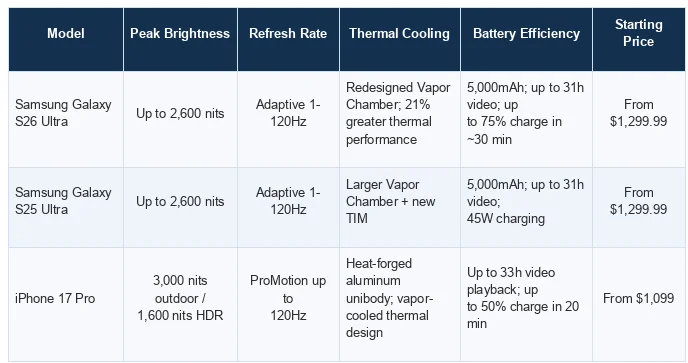
The table shows why the S26 Ultra is not the obvious winner on every raw metric.
The iPhone 17 Pro claims the strongest outdoor brightness figure and a lower entry price, while the S25 Ultra remains the conservative Samsung option.
But neither competitor integrates hardware-level side-view privacy in the same way, which is precisely why the S26 Ultra earns attention from mobile teams rather than just enthusiasts.
The Camera Setup: More Than Just Megapixels
The camera system is still a flagship asset; it is simply no longer the entire story.
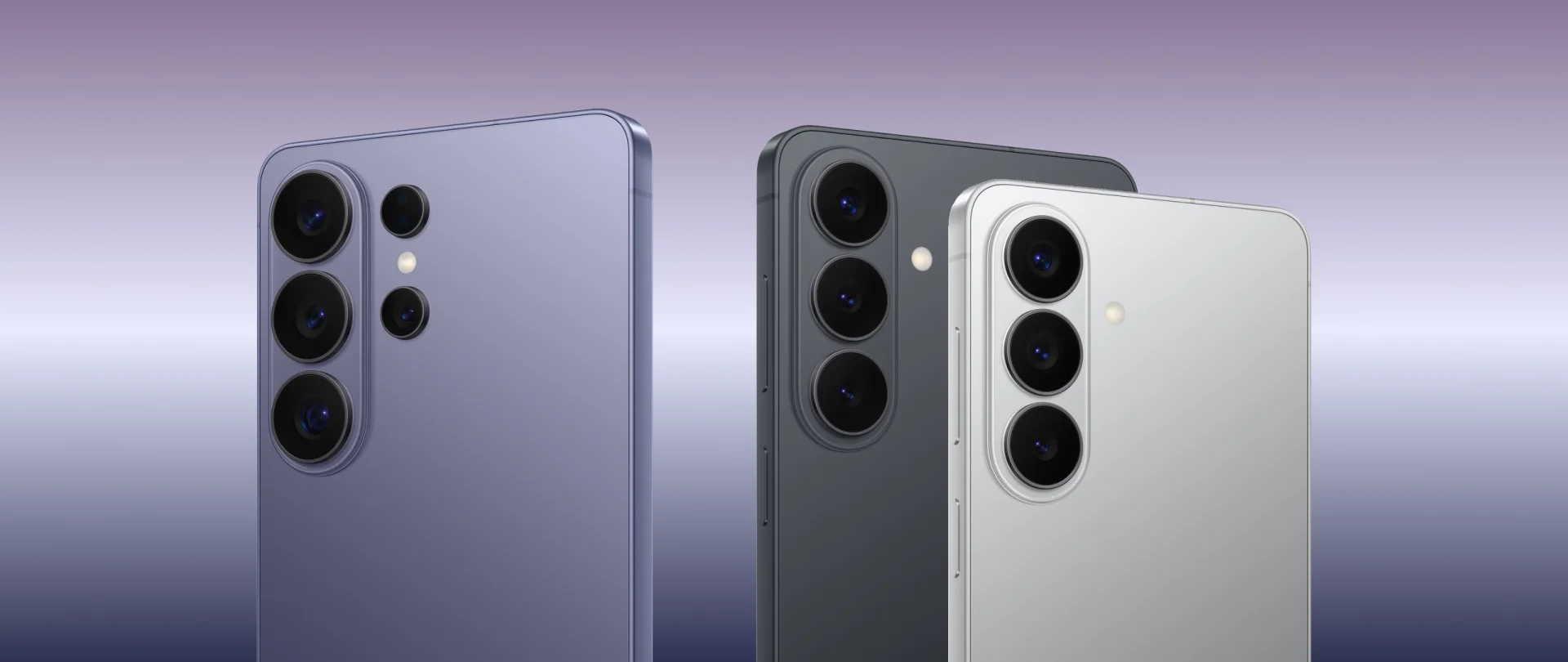
Samsung positions the S26 Ultra with a 200MP wide camera at F1.4, a 50MP ultra-wide at F1.9, a 50MP 5x telephoto at F2.9, and a 10MP 3x telephoto, backed by a stronger image pipeline and improved noise reduction in low light.
That matters in professional terms more than in social-media bragging terms.
For founders and creative leads who shoot reference stills, for agency teams capturing client-site content, and for operators who rely on Expert RAW or large-sensor flexibility, the S26 Ultra looks like a better field camera than a spec-sheet trophy.
The wider main aperture should help in low light, while Samsung's emphasis on sensor-specific noise reduction suggests cleaner evening footage and more usable files straight out of the device.
In other words, the camera is not just about megapixels. It is about reducing the friction between seeing something and shipping something.
If your phone is a scouting camera, a social-content backup, a note-taking lens, and an occasional RAW capture tool, the S26 Ultra keeps pace with that workflow.
Frequently Asked Questions (FAQ)
Does the Privacy Display make the screen look darker?
For the person looking straight at the device, the trade-off is manageable and far smaller than with old adhesive privacy films. The intentional dimming happens from the side, because that is where the protection is aimed. In practice, buyers should assume a privacy-versus-brightness compromise when the mode is active, especially in very bright surroundings, but not a permanent downgrade to the panel.
Can I still use the screen for watching movies with friends?
Yes. That is exactly why the software toggle matters. Privacy Display is valuable because it can behave like a business tool when you need it and step out of the way when you do not. For shared viewing, creative review, or travel entertainment, turn the feature off and use the screen like a normal premium OLED.
How tough is the new Gorilla Glass Armor 3?
This is the one spec buyers should verify carefully. Samsung's launch materials broadly emphasize Corning Gorilla Glass and Armor Aluminum construction, but the naming around the newest front-glass generation is not presented consistently across all regional materials. The safe procurement takeaway is that the S26 Ultra remains a flagship-grade durable device, but teams should confirm the exact cover-glass branding in their market before treating 'Armor 3' as a purchasing requirement.
The Verdict: Is it a Day-One Buy?
The honest recommendation is this: the Galaxy S26 Ultra is a day-one buy only if its new privacy behavior solves a real working problem for you.
If most of your smartphone use happens at home or in a private office, the S25 Ultra and iPhone 17 Pro remain excellent alternatives, and the S26 Ultra's innovation may feel interesting rather than essential.
But for agencies and start-ups, the equation is different.
These are teams that live in motion. They work from co-working spaces, trains, airport lounges, client lobbies, and shared offices. In that world, Privacy Display is not cosmetic.
It is a functional upgrade that changes how confidently the device can be used. Add the faster Galaxy-tuned Snapdragon platform, the improved thermal system, and a stronger low-light camera stack, and the S26 Ultra becomes more than another premium phone. It becomes a more credible mobile workstation.
That is why the right commercial move is not impulsive consumer pre-ordering.
It is a structured waitlist strategy for the first shipment. If your business wants the benefits without overcommitting, reserve an initial pilot batch, test it with the people who handle confidential client work in public, and expand only after measuring the effect on productivity and screen privacy in the field.