Categories
IT Shop
Blog

Cyber Security Summit 2026 in Belgrade: What Small Businesses Should Watch For

Cyber Security Summit 2026 is scheduled for 29 October at Mona Plaza in Belgrade. The first summit took place in 2024, followed by another conference in 2025. Last year’s programme included artificial intelligence, infrastructure security and digital resilience. This year, the organisers plan to discuss the financial consequences of cyber incidents, companies’ dependence on suppliers and how to respond during an attack.

The summit is aimed primarily at executives and specialists in cybersecurity, IT and risk management. For small businesses, the most relevant part of the programme concerns business continuity. It raises concrete questions: which services does the company depend on, what happens if they stop working, and who makes the decisions?

3 min read•October 23, 2026
Cyber Security Summit 2026 in Belgrade: What Small Businesses Should Watch For

The Cost of a Cyber Incident
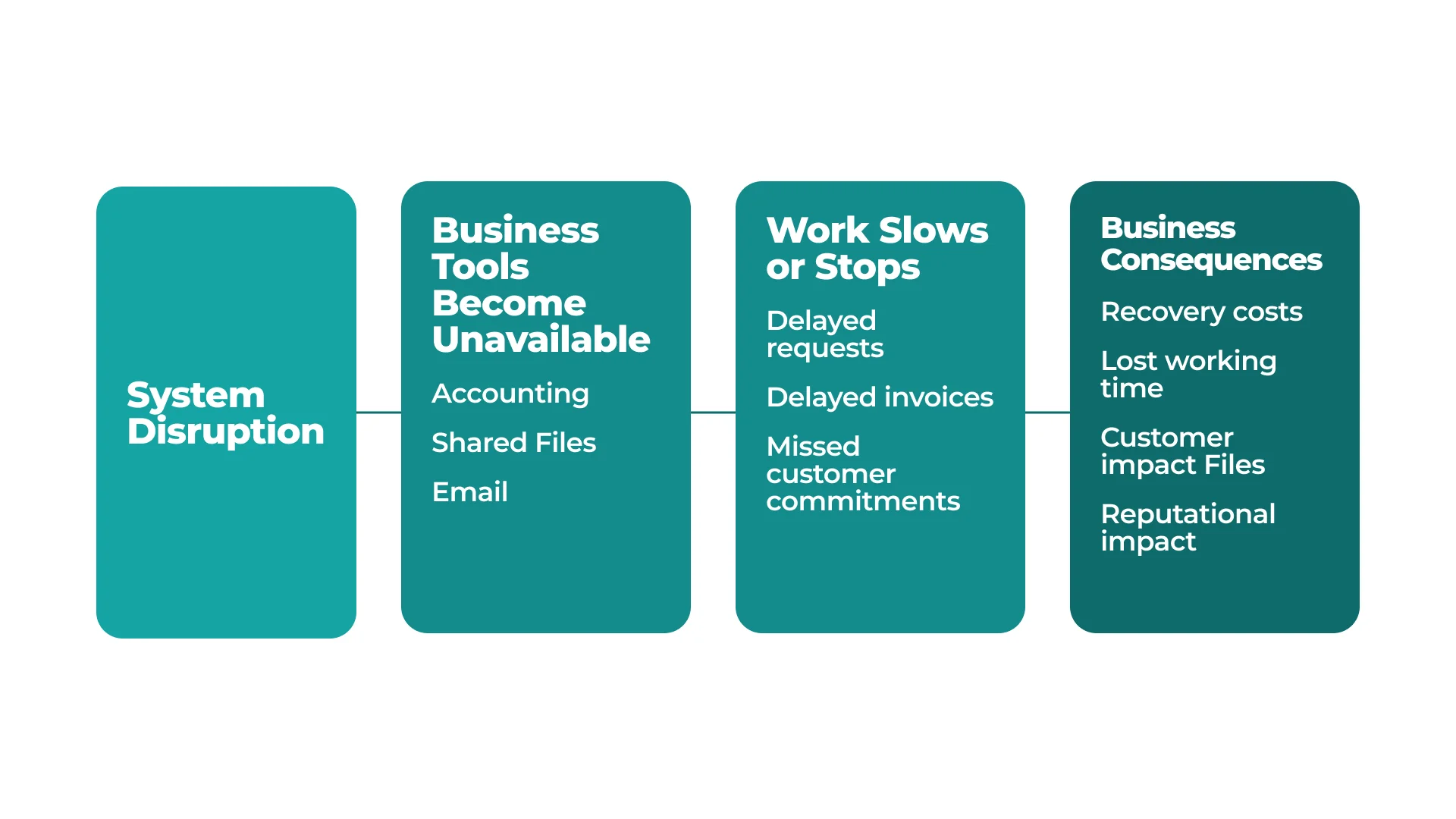
Diagram showing how a system disruption makes accounting tools, files and email unavailable, delays work, and leads to recovery costs and effects on customers and reputation
An IT disruption can cause work delays, additional costs and missed commitments to customers

The panel “Cyber Risk Evolution: Who Really Pays the Price?” focuses on consequences beyond the IT department. Participants plan to discuss the effects on operations, customers, reputation and finances, as well as the role of insurance. The programme also asks whether cyber risk can be transferred to another party or whether a company must still manage it itself.

A small business manager can assess risk by looking at day-to-day processes. If email, accounting software or shared documents are unavailable for a day, which customer enquiries would go unanswered, which invoices would not be issued on time, and which commitments would be at risk? Restoring access would account for only part of the losses. A downtime assessment should consider lost revenue, the impact on customers and responsibility for restoring operations.

What Happens When a Supplier Has an Outage?
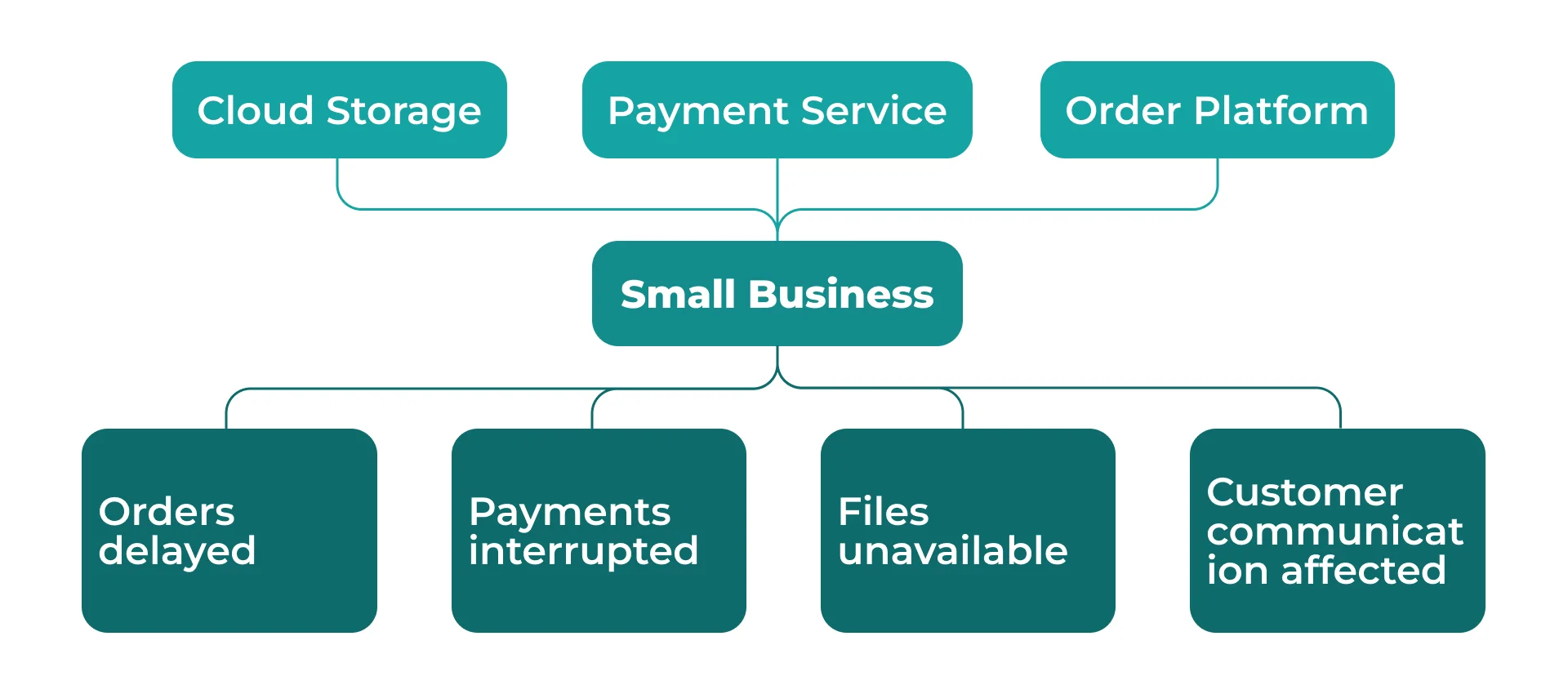
Diagram showing a small business’s dependence on cloud storage, a payment service and an order platform, with risks of delayed orders, interrupted payments, unavailable files and disrupted customer communication
Disruptions at external service providers can affect order processing, payments, file access and customer communication

The “Supply Chain Under Pressure” panel focuses on how organisations depend on one another. According to the programme, participants will examine how a cyber incident affecting a supplier or partner can disrupt other companies. Business continuity and crisis management are among the announced topics.

For small businesses, these dependencies are part of everyday operations. Orders may arrive through an external platform, payments may be processed by a separate provider, and working files may be stored in the cloud. The company does not control these suppliers’ infrastructure, but it remains responsible for serving its customers. When examining examples, key questions are how quickly a company learns about an incident, who contacts the supplier, and which operations can continue until service is restored. Approaches used by large organisations would need to be adapted to the resources of a smaller team.

Who Makes Decisions During an Incident?
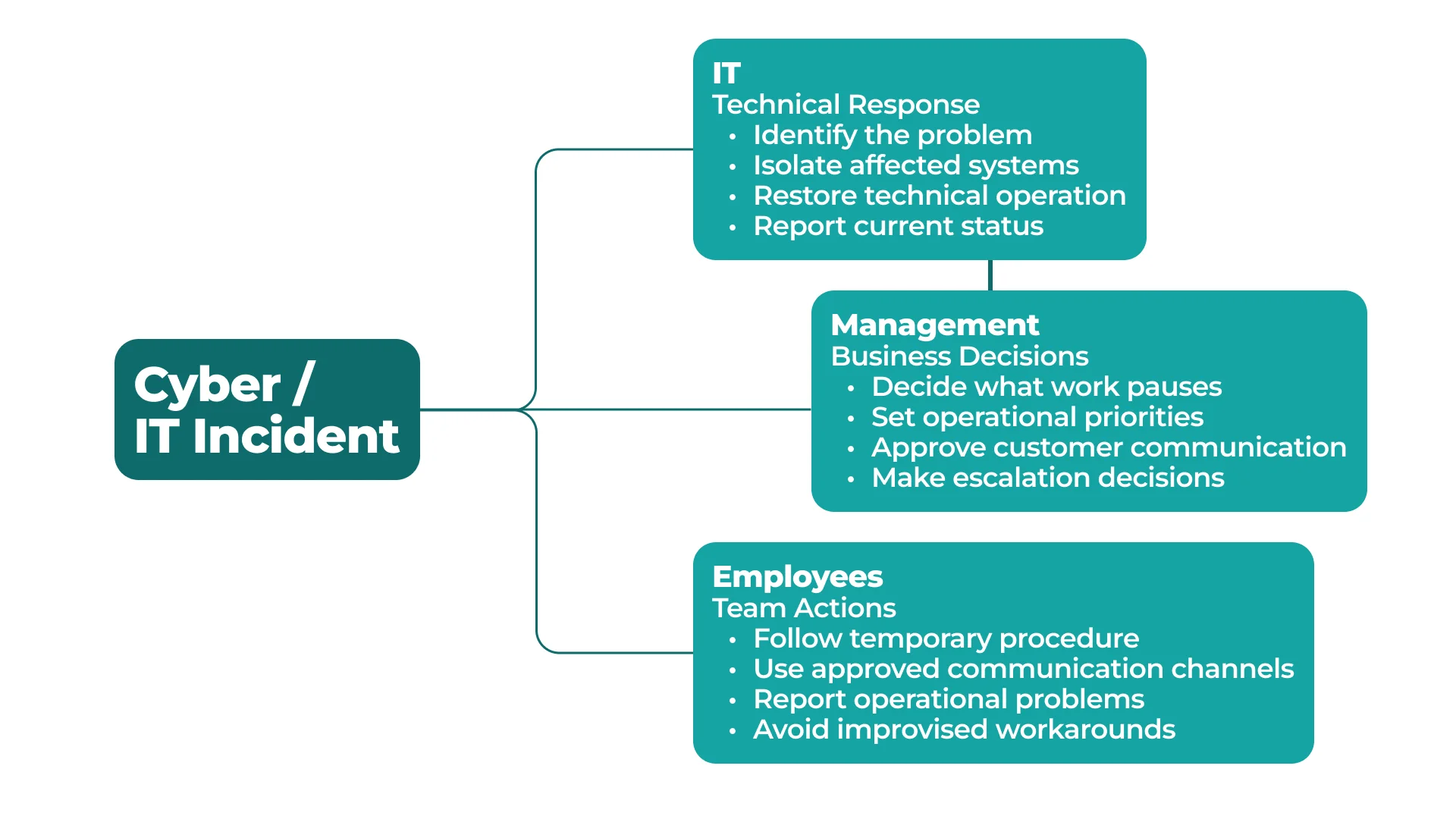
Diagram of roles during a cyber or IT incident: IT restores systems, management sets priorities and makes decisions, and employees follow temporary procedures and report problems
Effective incident response requires clear responsibilities for IT, management and employees, agreed in advance

The panel “The Future of SOC, CERT Operations: AI, Network Intelligence and Cyber Resilience Beyond Compliance” focuses on security monitoring, incident response, automation and business resilience. The panel on critical infrastructure will address the first 60 minutes of a serious incident. The methods used by specialist teams may be complex for a small company, but clear responsibilities matter regardless of company size.

While an IT specialist investigates the cause of an outage, a manager must decide which operations to pause, how to contact employees and what to tell customers. If responsibilities have not been defined in advance, reaching those decisions can take longer. Pay attention to how speakers distinguish technical tasks from business decisions: who assesses the threat, sets priorities and handles communication. It is important to identify who can take on these roles in a small team.

The Cyber Security Summit programme is preliminary and may change. After the conference, we will separately review the conclusions and examples to assess their relevance to small businesses in Serbia. Current topics and speakers are listed in the organiser’s programme.

Useful articles

View All Articles →
Wi-Fi 6 or Wi-Fi 7: Which Standard Should You Choose for Your Office?
A
Artem Meleshkin • Oct 21

Wi-Fi 6 or Wi-Fi 7: Which Standard Should You Choose for Your Office?

Wi-Fi 6 is designed to work efficiently with many connected devices and high network demand. Wi-Fi 7 is a newer generation that can transfer data faster and reduce delays. However, its benefits are only available when the new standard is supported by both the access point and the laptop, phone or other connected device. For many small and medium-sized offices, Wi-Fi 6 remains a practical baseline. Wi-Fi 7 makes more sense when designing a new office, carrying out a major network upgrade or choosing equipment intended to remain in service for many years. If Microsoft Teams calls keep freezing despite a gigabit fibre connection, the internet service provider may not be the source of the problem. The cause could be the access points, network cables, other network equipment or poor access point placement.

What Is a VESA Mount? Create a Clean and Ergonomic Desk Setup in 5 Simple Steps
A
Artem Meleshkin • Oct 20

What Is a VESA Mount? Create a Clean and Ergonomic Desk Setup in 5 Simple Steps

A VESA mount is a standardised mounting interface that allows a monitor or television to be attached to a compatible desk mount, wall mount or stand. Look at your desk. Your monitor probably works perfectly well, but its factory stand takes up space that could be used for a keyboard, laptop or docking station, or simply left clear. On most office monitors, the VESA interface consists of four mounting holes on the back of the screen. VESA stands for Video Electronics Standards Association. This standard allows screens to be securely attached to desk mounts, wall mounts, stands or mobile carts. The most common mounting patterns for monitors are 75 × 75 mm and 100 × 100 mm. M4 screws are normally used, but the exact screw length should always be checked in the manufacturer’s instructions. These patterns are included in the VESA specification and are widely used for office monitors.

NVIDIA RTX Spark: N1X, a new superchip for work, AI and gaming
A
Artem Meleshkin • Oct 19

NVIDIA RTX Spark: N1X, a new superchip for work, AI and gaming

On October 16, NVIDIA celebrated the retail launch of laptops powered by the RTX Spark platform at Berlin’s XPERION. Visitors tried the devices in games and creative applications, while AI demonstrations showed how models perform tasks directly on a laptop. NVIDIA founder and CEO Jensen Huang made a surprise appearance. He spoke with visitors, posed for photos and gave away five laptops bearing his signature. During the Festival of Lights, the Berlin TV Tower featured RTX Spark-themed lighting. The platform was unveiled in May, followed by device demonstrations at IFA in September. The first models are now on sale. The new laptops combine a Grace CPU, Blackwell RTX graphics and up to 128 GB of unified memory for work, local AI and gaming. The launch brings updates to creative applications, simpler AI assistant setup and new developer tools. The laptops also support DLSS 5 for gaming. NVIDIA plans to release further updates in October and November.