

What Is VoIP?
VoIP stands for Voice over Internet Protocol. In practical terms, it means office calls are carried as data across your network instead of travelling through traditional copper phone lines.
A VoIP call can happen through:
an IP desk phone
a laptop app
a mobile app
a softphone
a headset
an integrated communication platform
For office phone systems, this adds more flexibility to the existing call model. One office number can support multiple users, devices, locations, desk phones, apps, and call-routing rules. The key point is that VoIP depends on the quality of the network underneath it.
Voice over IP Explained: How Office Calls Travel Over the Network
Here is voice over IP explained simply.
When someone speaks during a VoIP call, the voice is converted into digital data packets. Those packets travel across the local network and the internet. At the other end, the packets are rebuilt into audio so the other person can hear the conversation.
That process happens quickly, but it depends on several technical conditions:
enough bandwidth for voice traffic
low latency, so the conversation does not feel delayed
low packet loss, so words are not cut off
stable Wi-Fi or LAN connectivity
reliable routing and firewall configuration
QoS rules for voice and video traffic
QoS means Quality of Service. It is a network configuration that gives priority to voice and video traffic over less urgent traffic, such as file downloads or general browsing.
Without the right network setup, a VoIP phone system can look like the problem even when the real issue is Wi-Fi coverage, overloaded access points, cabling, switching, routing, or missing QoS.
What You Need Before Starting
Before starting, confirm the network and user requirements first.
Check:
how many users need phone numbers or extensions
where calls happen: desks, reception, meeting rooms, home offices, and mobile users
which users need IP desk phones
which users can work through laptop or mobile apps
whether headsets are required
Wi-Fi coverage in call zones and meeting rooms
LAN cabling quality and availability
PoE switch availability for access points and IP phones
router and firewall configuration
VLAN requirements for voice traffic
QoS rules for voice and video
current video, chat, or collaboration tools
number-porting requirements
support requirements after implementation
This turns VoIP implementation into a controlled infrastructure project rather than a simple phone-system change.
Step 1: Map How Your Team Takes Calls
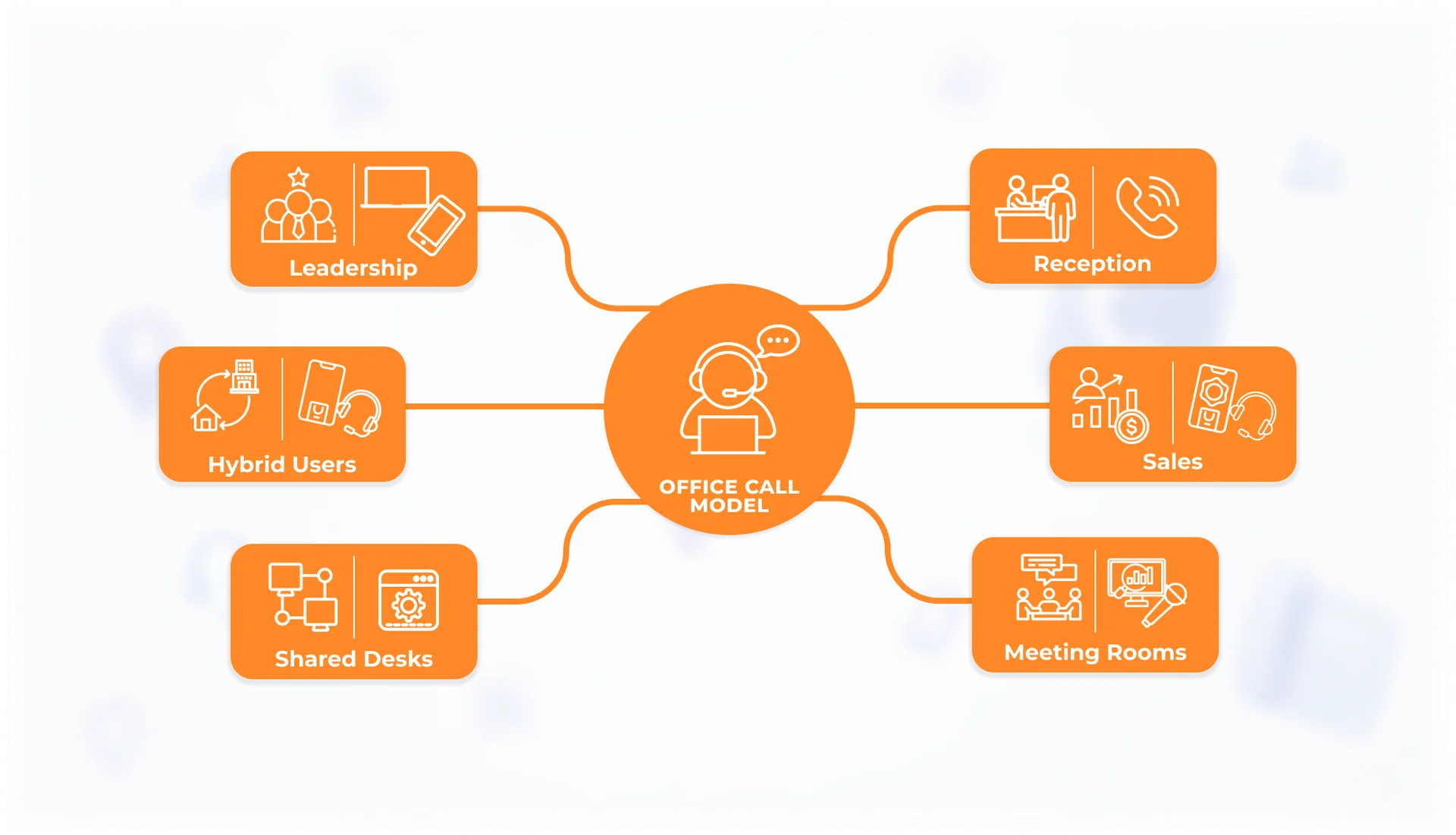
Start by mapping where calls actually happen. For many SMEs, calls no longer happen only at one fixed desk. They happen across:
desks
reception
meeting rooms
home offices
mobile users
laptop apps
headsets
IP desk phones
This matters because the right VoIP setup depends on user behaviour.
A receptionist may still need a fixed IP desk phone with clear call handling. A sales or account manager may need a mobile app and headset. A meeting room may need reliable audio through a room system. A leadership user may need the same office number to work across laptop and mobile devices.
Modern office phone systems work best when the call model matches the way the team works.
Step 2: Choose How VoIP Fits Into Your Office Phone System
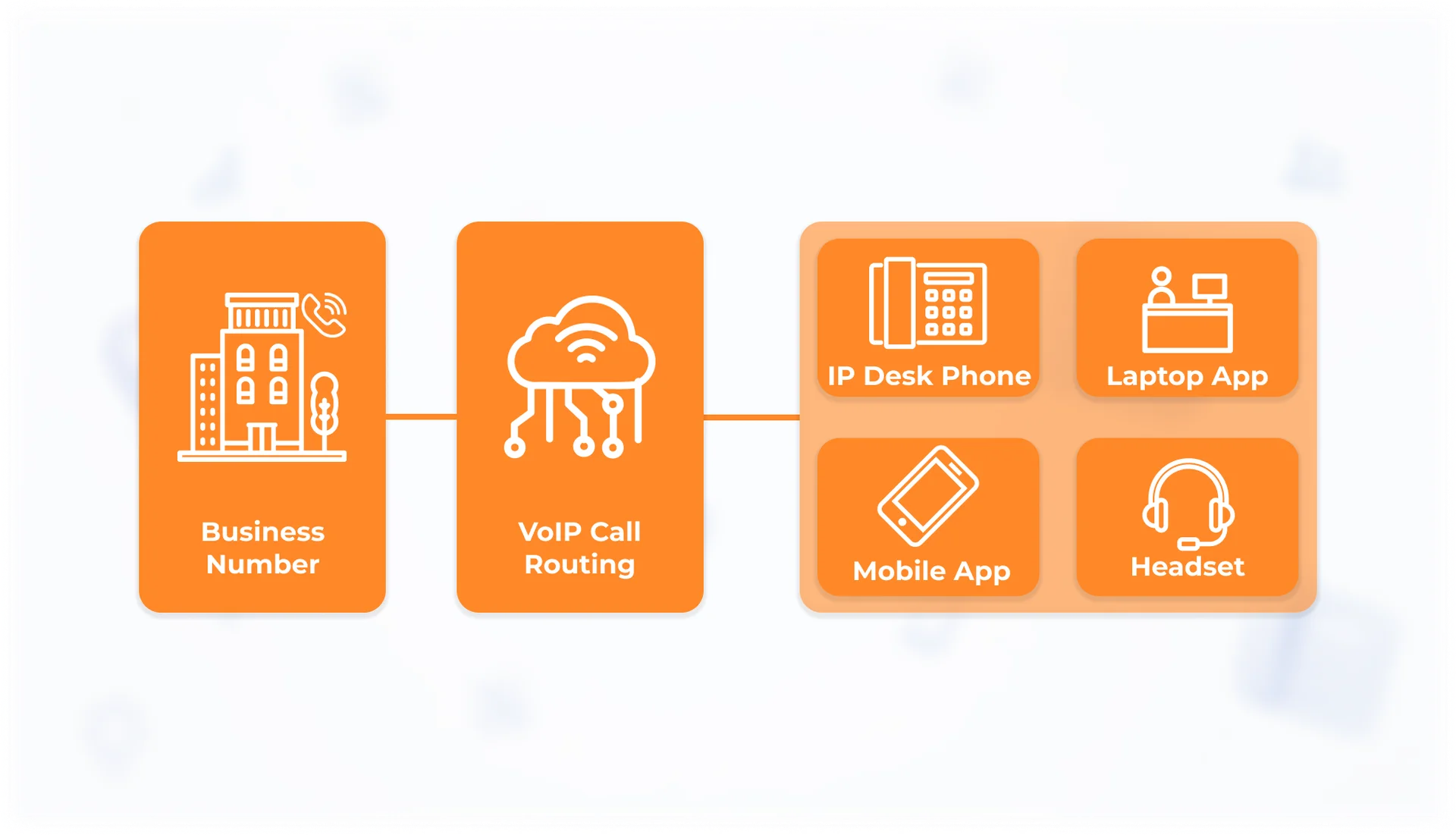
VoIP is not about removing every desk phone. It changes how the office number behaves and where calls can be handled. With VoIP, one office number or extension can work across several devices, including IP desk phones, laptop apps, mobile apps, and headsets.
New users can be added without depending only on physical phone-line changes. Call routing can be adjusted in software. Daily calling can stay on desk phones where they make sense, or move into apps, headsets, and cloud-based admin tools where that is more practical.
A modern office phone system may include:
business numbers and extensions
call routing
voicemail
call forwarding
ring groups
reception call handling
mobile and desktop apps
IP desk phones where needed
headset support
reporting and admin controls
IP desk phones still make sense for reception, meeting rooms, or fixed workstations. But for many users, the main calling experience can also happen through apps and headsets.
The goal is not to remove every phone from the office. The goal is to keep desk phones where they serve a clear operational purpose and add VoIP where the business needs more flexible, manageable, and location-independent calling.
Step 3: Understand UCaaS vs VoIP
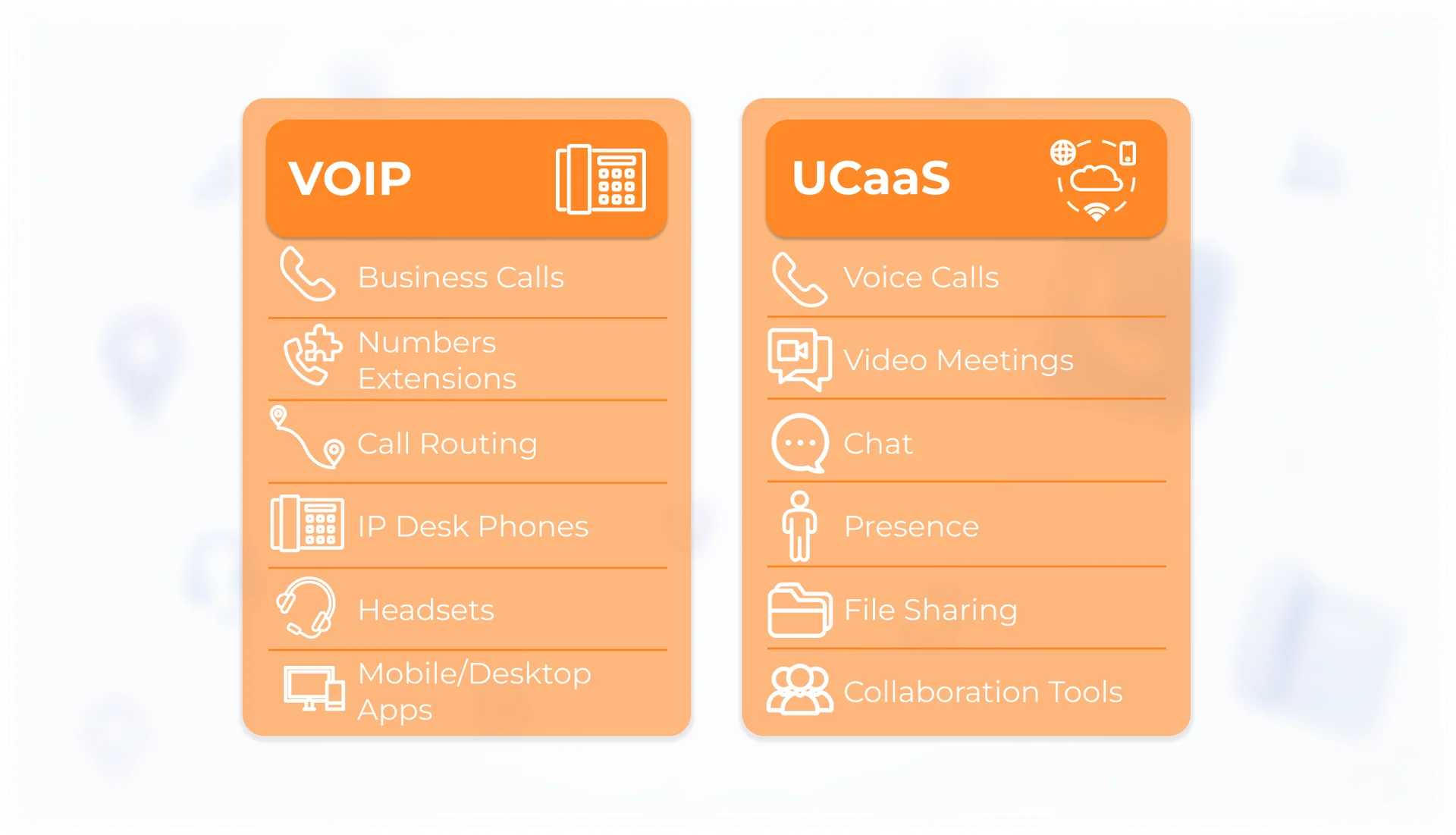
VoIP is the voice layer. It allows calls to travel over IP networks instead of traditional phone lines.
UCaaS, or Unified Communications as a Service, is the wider communication platform.
It can combine calls, video meetings, chat, presence, file sharing, and collaboration tools into one cloud-based workflow.
The difference is simple:
VoIP modernizes business calling by carrying voice over IP networks.
UCaaS connects calling with broader communication tools.
For example, a company may use VoIP for business numbers, extensions, call routing, IP desk phones, apps, and headsets. A UCaaS setup can go further by connecting voice calls with video meetings, chat, status availability, and collaboration inside Teams-style or Zoom-style workflows.
For SMEs, the question is not only UCaaS vs VoIP. The better question is: how much communication should live in one managed platform? If the team mainly needs business calling, VoIP may be enough. If the team also needs integrated video, chat, presence, and collaboration, UCaaS may be the better fit.
Step 4: Test the Network Before Implementation
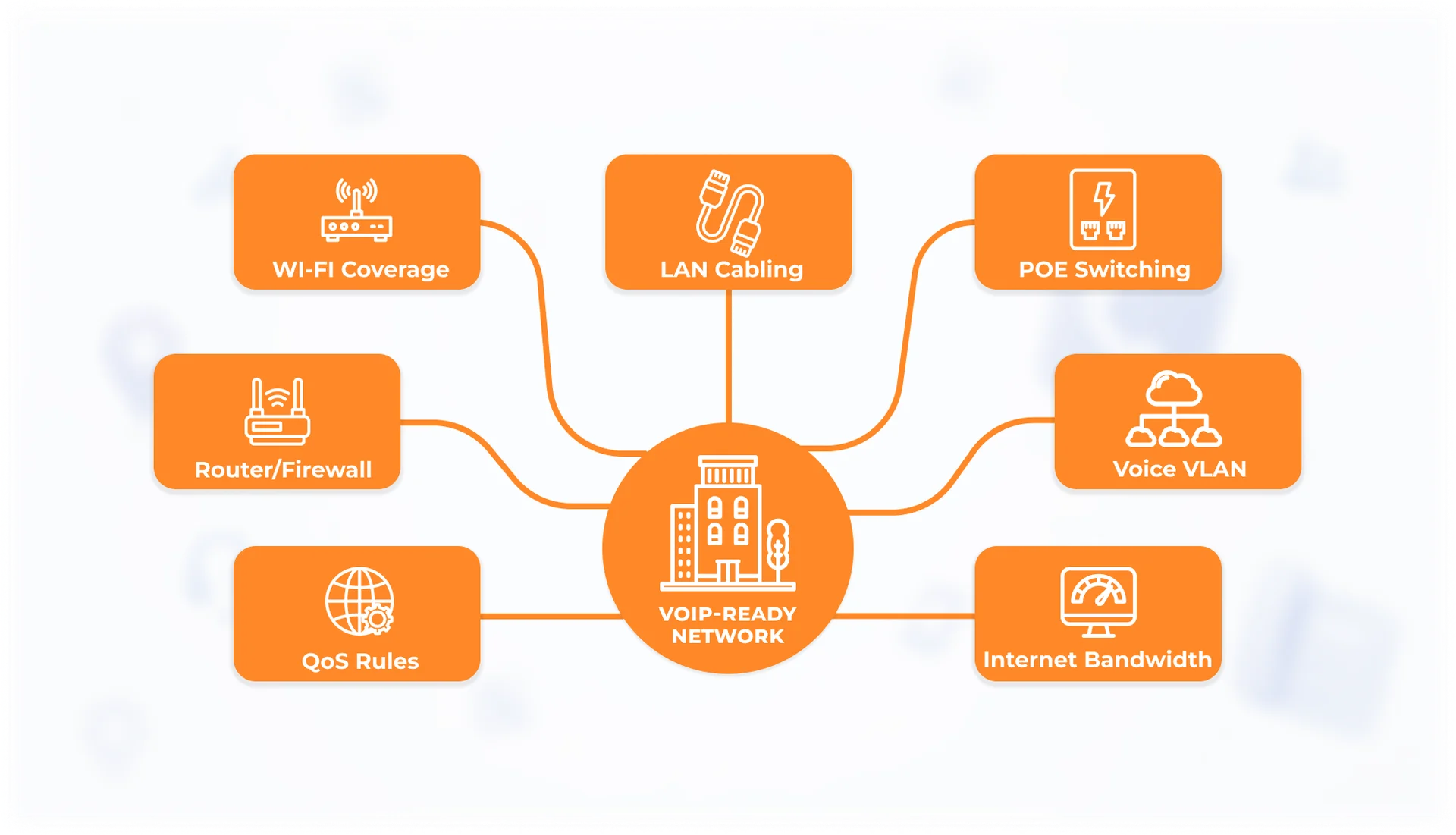
VoIP moves call handling onto the IP network, so it needs a clean and stable network.
This is the most important technical point in the project.
If Wi-Fi drops, calls drop.
If access points are overloaded, voices can sound robotic.
If latency is high, conversations feel delayed.
If packet loss is present, audio can cut out.
If PoE is missing, IP phones and access points may not be powered correctly.
If QoS is not configured, voice traffic may compete with general internet use.
In office audits, the first VoIP issue is rarely the phone app itself. It is usually one of the supporting network layers:
weak Wi-Fi coverage
poor roaming between access points
overloaded access points
weak LAN cabling
missing PoE
old switches without VLAN support
router or firewall limits
no QoS rules for voice traffic
insufficient internet uplink capacity
Before implementation, test Wi-Fi coverage, LAN cabling, PoE readiness, router and firewall configuration, VLAN design, and QoS for voice and video.
Common VoIP Implementation Mistakes
Implementing VoIP is not simply a matter of replacing an existing phone system.
Common mistakes include:
Porting phone numbers before testing the network
Numbers should be ported only after Wi-Fi, LAN, routing, firewall, PoE, and QoS readiness have been confirmed.Testing only near the router
Calls should be tested where people actually work: at desks, in meeting rooms, at reception, and in shared areas.Ignoring meeting rooms
Meeting rooms often use voice, video, screen sharing, and collaboration tools at the same time.Using outdated switches without PoE or VLAN support
IP phones, access points, and segmented voice traffic may require newer switches.Assuming UCaaS will fix weak Wi-Fi
A cloud communications platform still depends on the local network.Overlooking QoS
QoS helps keep voice and video stable when the network is busy.Skipping post-implementation support
After launch, users may need help with apps, headsets, voicemail, routing, and device operation.
Make Sure Your Network Is Ready for VoIP
Before implementing VoIP, test whether Wi-Fi, LAN, switching, routing, PoE, VLANs, firewall rules, and QoS can support real calls across desk phones, apps, headsets, meeting rooms, and mobile users.
VoIP can make office phone systems more flexible, but the network has to be ready first. Ensure your network is ready for VoIP. Book an infrastructure audit today.
Our Infrastructure Solutions team can review Wi-Fi coverage, LAN cabling, PoE readiness, router and firewall rules, VLAN structure, QoS settings, desk-phone requirements, app and headset usage, and growth requirements before you implement VoIP across your office phone system.
FAQ
Is VoIP the same as internet calling?
Almost. In an office context, VoIP means a managed phone system with users, numbers, routing, call handling, and business-grade configuration.
Do we still need desk phones with VoIP?
Yes, in many scenarios. IP desk phones still make sense for reception, meeting rooms, shared areas, fixed workstations, and users who need reliable physical call handling. Other users may work better with laptop apps, mobile apps, and headsets.
What happens if our network is not ready?
Call quality can suffer through dropouts, delay, echo, distorted audio, or failed calls. That is why Wi-Fi, LAN, PoE, firewall rules, and QoS should be checked before implementation.
What is the difference between UCaaS and VoIP?
VoIP is the voice-calling layer. UCaaS is a wider cloud communication platform that can combine calls, video meetings, chat, presence, file sharing, and collaboration tools.